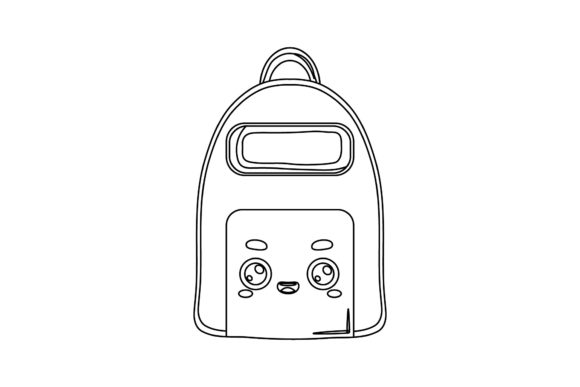
Creative Possibilities with Back to School Kawaii Cute Bags Outline Digital Files
Preparing for a new school year often involves gathering supplies, organizing schedules, and finding ways to make the experience enjoyable for students of all ages. One growing trend that combines practicality with personal expression is the use of kawaii-themed accessories and stationery. The Back to School Kawaii Cute Bags Outline design set offers a versatile foundation for crafters, educators, and small business owners looking to add a touch of whimsy to their projects. This collection of digital files provides outlines of adorable bag shapes that can be customized, scaled, and integrated into a wide range of applications.
Kawaii, which means "cute" in Japanese, has become a global aesthetic that resonates with children and adults alike. The Back to School Kawaii Cute Bags Outline set taps into this appeal by providing clean, scalable vector and raster files that capture the playful spirit of the back-to-school season. Whether you are designing stickers for a classroom reward system, creating iron-on patches for fabric bags, or building a branding kit for a stationery shop, these outlines offer a ready-to-use starting point.
Understanding the Digital Product Package
The product includes six digital files delivered on a 1920px by 1280px canvas. This generous canvas size ensures high resolution for both print and screen use, while the inclusion of multiple formats makes the set accessible to users with different software preferences and project needs.
- AI File (Adobe Illustrator) – Perfect for advanced vector editing, allowing you to tweak anchor points, change stroke weights, and apply custom color palettes.
- EPS File – A widely compatible vector format that can be opened in many graphic design applications, including older versions of Illustrator and CorelDRAW.
- SVG File – Ideal for web use, digital cutting machines (like Cricut and Silhouette), and responsive design projects. SVG files maintain crisp edges at any size.
- DXF File – Specifically useful for CAD software and certain cutting machines, providing another layer of compatibility for manufacturers and hobbyists.
- JPG File – A high-quality raster image ready for immediate printing or use in documents and presentations.
- PNG File – A transparent background raster format that works well for layering in design software or uploading to print-on-demand platforms.
Having access to all six formats eliminates the need to convert files manually, saving time and reducing the risk of quality loss. The Back to School Kawaii Cute Bags Outline design is delivered with an easy-to-edit structure, meaning users can open the files, select elements, and begin customizing immediately.
Why Multiple Formats Matter for Creative Workflows
Different projects require different file types. A teacher designing a class schedule poster might prefer the JPG for quick insertion into a word processor, while a craft hobbyist using a vinyl cutter will need the SVG or DXF. A professional graphic designer working on a branding package may rely on the AI or EPS for precision editing. The inclusion of both vector and raster formats in the Back to School Kawaii Cute Bags Outline set ensures that no matter your toolset, you have a compatible option ready to use.
Vector files (AI, EPS, SVG, DXF) are resolution-independent, meaning they can be scaled up to billboard size or down to a business card without losing clarity. Raster files (JPG, PNG) are better suited for complex gradients and photographic backgrounds. By providing both, this product accommodates a wide spectrum of use cases, from digital planners to physical merchandise.
Practical Applications Across Different Audiences
The true value of the Back to School Kawaii Cute Bags Outline design lies in its adaptability. Here are several real-world scenarios where these files can be put to work.
Educators and Classroom Decor
Teachers can use the outline designs to create name tags, locker labels, bulletin board accent pieces, or reward stickers. The kawaii bag shapes can be printed on adhesive paper and cut out with scissors or a cutting machine. Because the files come in SVG and DXF formats, cutting machines like Cricut or Cameo can precisely cut the outlines, saving hours of hand-cutting. The transparent PNG also allows teachers to layer the bag design onto classroom newsletters or behavior charts without a white box around the image.
Small Business Owners and Craft Sellers
If you run an Etsy shop or sell at local markets, these outlines can become the basis for physical products. Consider applying the Back to School Kawaii Cute Bags Outline to tote bags, pencil cases, or lunch sacks using heat transfer vinyl. The vector files ensure that the design scales perfectly to fit any bag size. You could also offer digital products such as planner stickers or printable gift tags. The clear outlines make it easy to add color fills, patterns, or text inside the bag shapes.
Parents and Home Organizers
Parents preparing for back-to-school season can use the files to create customized labels for their children's belongings. Waterproof sticker paper printed with the PNG design can be applied to water bottles, notebooks, and lunch boxes. The kawaii aesthetic makes labeling fun for kids, reducing the likelihood that items will be lost or mixed up. The 1920x1280 canvas size also works well for printing multiple labels on a single sheet.
Digital Creators and Content Developers
For those who create digital planners, clip art sets, or social media templates, the SVG and PNG files offer clean, scalable elements that can be imported into apps like Canva, Procreate, or Photoshop. The Back to School Kawaii Cute Bags Outline can be recolored, rotated, or combined with other graphics to build cohesive themed collections. Because the outlines are simple and clear, they work well as coloring page elements for kids' activity books or as icons in a school-themed mobile app.
Editing and Customization Tips
Getting the most out of these files involves understanding a few basic editing techniques. Here are some practical suggestions for users at different skill levels.
- Change stroke color and weight in vector software. Open the AI or SVG file in Illustrator, Inkscape, or Affinity Designer. Select the outline and adjust the stroke to any color or thickness. This is useful for matching a school's color scheme or a specific brand palette.
- Add fill patterns or gradients. The outlines are closed paths, so you can easily fill them with solid colors, gradients, or repeating patterns. Create a patchwork effect by filling different bag shapes with varying colors.
- Combine with text. Use the designs as a background or border for text. For example, place a student's name inside one of the bag outlines for a custom locker tag. The transparent PNG makes this especially simple in presentation software.
- Scale proportionally. Always hold the Shift key (or equivalent) when resizing to maintain the aspect ratio. This prevents the cute proportions from becoming distorted.
- Layer multiple outlines. The DXF and SVG formats allow you to stack different bag sizes or rotate them for a collage effect. This is great for scrapbooking or creating a repeating pattern for fabric printing.
Users should also consider the material they are printing or cutting onto. Test prints on plain paper are recommended before using expensive vinyl or sticker paper. The high-resolution canvas ensures that even small details remain sharp when printed at standard sizes.
Characteristics That Make the Design Stand Out
The Back to School Kawaii Cute Bags Outline set has several features that enhance its usefulness for a broad audience.
- Clean lines and simple geometry – The outlines are not overly detailed, which makes them suitable for cutting machines and fast printing. They also serve as a blank slate for your own creative additions.
- Balanced proportions – The bag shapes are drawn with classic kawaii proportions: rounded corners, slightly chunky handles, and a friendly overall silhouette. This appeals to both younger and older audiences.
- Theme alignment – The design directly ties into the back-to-school season, making it timely for August-September marketing campaigns, classroom preparation, and seasonal product launches.
- Cross-platform compatibility – With six file formats included, there is virtually no software barrier to using these designs, whether you work on Windows, Mac, or even mobile apps that support SVG imports.
Considerations When Using Digital Outlines
While the product is designed to be user-friendly, a few considerations can help ensure a smooth experience.
First, check your software's compatibility with the provided formats. Most modern design programs support AI, EPS, SVG, and DXF, but older versions may require a file conversion. The JPG and PNG are universal and will open in any image viewer. Second, remember that the files are outlines, meaning they do not include pre-applied fill colors or textures. This is intentional—it gives you full control over the final look. However, if you prefer a ready-colored design, you will need to add fills yourself.
Third, consider the intended output size. The canvas is 1920x1280 pixels, which is roughly 6.4 x 4.27 inches at 300 DPI. If you need a larger print, the vector formats scale cleanly, while the raster formats may show pixelation if enlarged significantly. For large banners or posters, use the AI, EPS, or SVG files. For small stickers or labels, the PNG and JPG will be perfectly sufficient.
Observing the Kawaii Trend in School Culture
The rise of kawaii aesthetics in educational settings is more than a passing fad. Many educators have found that incorporating cute, friendly visuals into the classroom environment can reduce anxiety and increase engagement, especially for younger students. The Back to School Kawaii Cute Bags Outline taps into this by offering designs that feel approachable and fun. When children see their belongings decorated with cheerful images, they often take more ownership of their supplies.
From a business perspective, products featuring kawaii motifs consistently perform well in categories like stationery, bags, and accessories. Small business owners can leverage this cultural trend by using the outlines as the foundation for limited-edition back-to-school collections. The vector formats make it easy to produce variations—such as different colors or added details like bows or stars—without redrawing the core design.
Workflow Integration for Teams and Solo Creators
Whether you work alone or as part of a team, these files integrate smoothly into common production pipelines. A solo creator can download the set, open the SVG in a free tool like Inkscape, and produce cut files for a weekend craft fair. A design team can share the AI file across members, ensuring consistent branding across multiple products. The DXF format is particularly valuable for teams that use industrial cutting equipment, as it is a standard format for many CAD and manufacturing tools.
The thank-you note included with the product reinforces the collaborative spirit of the creative community. It acknowledges that each user will apply the design in their own way, and it expresses appreciation for the support that makes continued design work possible.
Final Thoughts on the Product's Value
The Back to School Kawaii Cute Bags Outline digital files provide a practical, high-quality resource for anyone involved in creating, teaching, or selling during the back-to-school season. The combination of six formats, a generous canvas size, and a universally appealing aesthetic makes this set a solid addition to any digital library. By offering flexibility across software and use cases, it empowers users to focus on the creative part of their projects rather than worrying about technical limitations. As you explore the possibilities of these outlines, you will likely discover applications beyond the classroom—from party decorations to personal accessories—all rooted in the simple joy of kawaii design.